I'm using emacs with C# Mode and when I turn on the speedbar, no files show up by default. I can choose "show all files" on the speedbar mode, but then every .cs file shows up with a '[?]' next to the name. How do I properly configure speedbar so it shows up with .cs files by default? How do I get the '[+]' next to each file so I can navigate inside the file?
-
I used speedbar earlier and got really irritated. I now use ECB. ECB uses its own buffer for the tree and can optionally show the outline of the CS file in a separate buffer. They all fit in the same frame while Speedbar has its own frame.
I have some custom stuff setup for ECB. You can see it here.
-
I think ECB with CEDET is simply too bloated. I use speedbar alone with emacs and I use the original parser for C/C++. Just add this line to your .emacs and you'll be ok:
   (speedbar-add-supported-extension ".cs")
   (add-to-list 'speedbar-fetch-etags-parse-list
         '("\\.cs" . speedbar-parse-c-or-c++tag))
This handles C# perfectly without a problem. Hope this helps.
-
It works for me.
I used
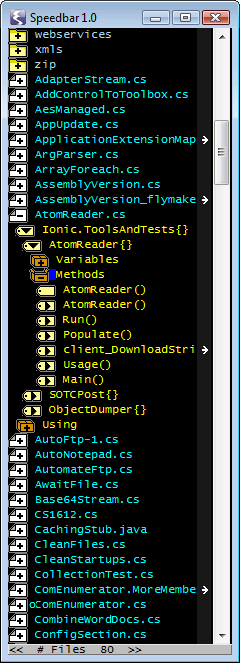
(speedbar-add-supported-extension ".cs")and got this:

0 comments:
Post a Comment