I am running Windows 7 Ultimate. If I open up IIS Manager, I see a list of "connections" on the left hand side. In previous versions, I would be able to select an option to "connect to another server" or "connect to another machine", but there is no such option visible anywhere here. The only thing in the list is my local machine.
Even in the address bar, if I manually type in the server location (\servername, even tried just servername), nothing happens (it just reverts back to my current local computer)
The documentation at http://technet.microsoft.com/en-us/library/cc732466%28WS.10%29.aspx seems to imply the very same steps... but there is just no button or menu option anywhere to do this. Am I missing something? I'm not even seeing a grayed out menu option.
EDIT: Under the "File" menu, I see 2 options:
- Save Connections (grayed out)
- Exit

Under the "Connections" pane, I see 1 button, grayed out. When I hover the mouse, it simply says "Up", appears to be usable if I browse into an element in my local computers IIS settings
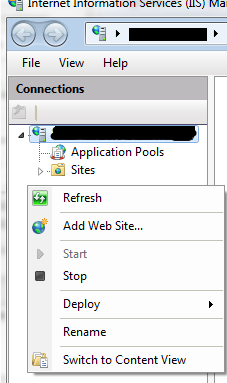
If I right click inside the pane itself, I see
- Refresh
- Add website (to the current host)
- Start
- Stop
- Rename
- Switch to Content View
UPDATE: I downloaded and installed the Remote Server Administration tools from http://www.microsoft.com/downloads/details.aspx?FamilyID=7D2F6AD7-656B-4313-A005-4E344E43997D&displaylang=en, and I enabled everything listed under "Remote Server Administration Tools" under "Turn Windows Features On or Off". Still nothing.
-
In the IIS Manager, try going to File->Connect to a Server. You're saying that's not there?
Matt : That is correct. Under File I see 2 options, 1) A grayed out "save connections", and exit.From rhart -
Have you tried running IIS Manager as Administrator? You need to be at an administrator to remotely connect to a server via IIS Manager.
Matt : As soon as you said that, I thought "that *must* be the problem". Alas, no luck. Interestingly, when I click "run as administrator", it doesn't prompt me, like other programs when I try to run as admin. I thought it must've been kicking off from something resident in memory from previous launches, so I rebooted completely, and it still didn't ask me to approve the app running as admin.Brian Knight : Check this link out - it'll help you enable your tools for remote admin via IIS Manager. http://learn.iis.net/page.aspx/159/configuring-remote-administration-and-feature-delegation-in-iis-70/Matt : The first half of that is for the target machine... when it finally discusses how to initiate the connection it says "In IIS Manager, click File and then click Connect to a Site (or Connect to an Application). " which is exactly what is missing for me. Their screen shot looks different (has more buttons) than I see.From Brian Knight -
Have you tried looking for the IIS remote administration tools - that's what I had to get used to when managing 2008 boxes remotely.
Matt : isn't that what IIS Manager is?Jon : Not sure cos it's been a while since I looked at 2008 - these any good? - http://www.microsoft.com/downloads/details.aspx?FamilyID=7D2F6AD7-656B-4313-A005-4E344E43997D&displaylang=enMatt : Gave it a shot (updated question) - no luck. Even turned on *every* feature inside "Turn Windows Features on or off -> Remote Admin Tools"From Jon -
Turns out I needed to install "IIS Manager for Remote Administration", which is discussed (and available for download) at http://www.iis.net/expand/IISManager. Why this is not part of the Windows 7 "Remote Administration Tools" I'm not sure. But after installing this I get the additional "connect" options.
Luke99 : I didn't see your answer before I posted mine. Good for you that you found the solution.From Matt -
I had to install the IIS remote administration tool (as stated by Matt, and suggested by several others). However, after the install, I ran into the same problem that Matt listed: when I tried to connect to the sites, I kept getting a 401 error message.
I did a complete reboot of the system; when I logged back into the system and then tried IIS remote administration tool again, this time I was able to connect to the external site. Not sure if the reboot solved the problem or if it was something else, but hopefully this will help someone else facing the same issue.
From Jim

0 comments:
Post a Comment